How to fix common Magento checkout errors

Your checkout is the cash register of your online store. If your cash register goes down you are in a panic and ensure all priority is focused on resolving the issue. The same goes for your checkout. According to BigCommerce, 22% of abandoned carts are a result of errors. Here are some common reasons for why your checkout may be broken and how to fix these issues:
1. 1-step checkout malfunction
Problem
When clicking the checkout button on the checkout page, customers are faced with a loading icon for an indeterminate duration.

This loading screen is caused by Magento trying to send a request to:
/en-ca/rest/en-ca/V1/guest-carts/f9a27bd8334084edd67c44cd18cfc249/set-payment-information:1
This request returns a 404 error as it cannot be found on the server.

Solution
The issue arises when the wrong token is used. Specifically, the POST command created a cart with an admin token. Guest carts are for anonymous users so as a result, the wrong GET call was used in this case.
To solve the issue use the POST command to create a guest token.
2. PayPal integration malfunction
Problem:
Many PayPal issues arise after specifying the payment card details and then during the checkout process the payment does not process causing an error. The result is infinite load, an error message or blank page.
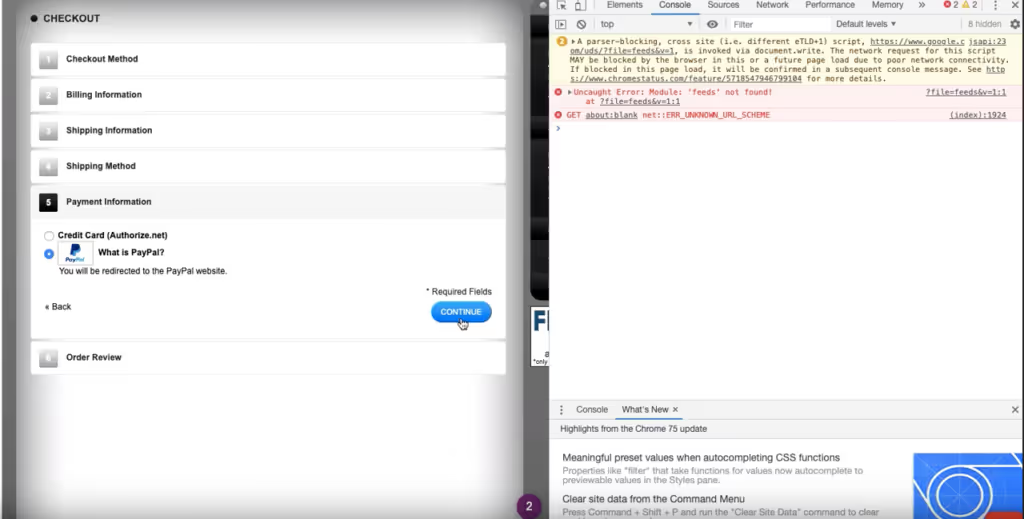
Solution:
The issue is often a result of inconsistent settings in Magento and PayPal. It is crucial to have the same settings in Magento and PayPal.
For the PayPal Express Checkout, AVS/CSC responses should be declined in PayPal Manager and in Magento Admin:
PayPal: Service Settings > Set Up > Security Options
Magento: Stores > Configuration > Sales > Payment methods
3. Magento 2 - 2-step checkout
Problem:
The Magento 2 checkout has been reported to be slow at times or show a blank screen as seen below. Many customers have reported this issue and it persists predominantly because of Magento’s new 2-step checkout system.
Solution:
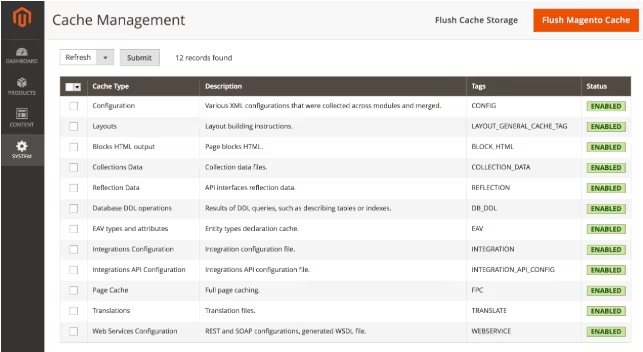
For slow checkout experiences make sure to turn on cache in the Magento Cache panel. You can access the Magento Cache panel by going to System > Cache Management.
Identify the usages of your PaymentTokenInterfaceFactory in your codebase and then specify the implementation for this payment token via di.xml. You can read more about payment tokens here.
Now that you can fix your Magento checkout issues, it's worth thinking proactively about how you detect them in the first place. Waiting for customers to report problems is a losing strategy — by the time you hear about it, sales and trust are already lost.
Noibu is an ecommerce analytics & monitoring platform purpose-built to help retailers protect and grow online revenue. Noibu monitors your site in real time, surfaces critical errors alongside their direct revenue impact, and gives your team the full technical context needed to prioritize and resolve them fast — before they affect your customers.
Ready to see Noibu in action? Book a demo today.